You're juggling three different apps. Maybe five. Your HR data lives in one place. Customer info sits in another. Project updates? Scattered across Slack, spreadsheets, and sticky notes.
Sound familiar?
Here's the truth. Running a small business shouldn't feel like herding cats. When your systems don't talk to each other, you lose time. You lose money. And your team loses sanity.
The good news? There's a better way.
It's called the Unified Advantage. And it's how smart SMBs are scaling faster without adding more tools to the pile.
Let's break it down into five simple steps.
Why Unification Matters (Before We Dive In)
Quick reality check.
The average small business uses 40+ different apps. That's not a typo. Forty. Most of those tools don't integrate well. Data gets siloed. Teams get frustrated. Growth stalls.
When you unify HR, CRM, and project management, everything changes:
- Less duplicate work. Enter data once. Use it everywhere.
- Better collaboration. Everyone sees the same information.
- Faster decisions. No more hunting through five dashboards.
- Happier teams. Simplicity wins every time.
Ready to make it happen? Let's go.

Step 1: Audit Your Current Tool Stack
You can't fix what you don't understand.
Start by listing every tool your team uses. Every single one. Include the random spreadsheets. The personal Trello boards. That HR app someone signed up for two years ago.
Ask yourself:
- What does each tool actually do?
- Who uses it daily?
- Does it integrate with anything else?
- How much does it cost per month?
Be honest here. Most SMBs discover they're paying for overlapping features. Three different tools might all have "task management." Two might track customer interactions.
Pro tip: Create a simple spreadsheet with columns for tool name, purpose, monthly cost, and users. You'll spot redundancies fast.
This audit reveals where you're bleeding time and money. It also shows you what functions you actually need in a unified system.
Step 2: Map Your Workflow Connections
Here's where things get interesting.
HR, CRM, and project management aren't separate islands. They overlap constantly. You just might not see it yet.
Think about this scenario:
- Sales closes a new client (CRM).
- You need to staff the project (HR).
- Work begins with deadlines and deliverables (Project Management).
See the connection? One event triggers actions across all three areas.
Now map your own workflows:
- When you hire someone new, what systems need updating?
- When you win a client, who needs to know and what happens next?
- When a project wraps up, how does that affect billing, team availability, and customer records?
Write these connections down. Draw lines between them if it helps.
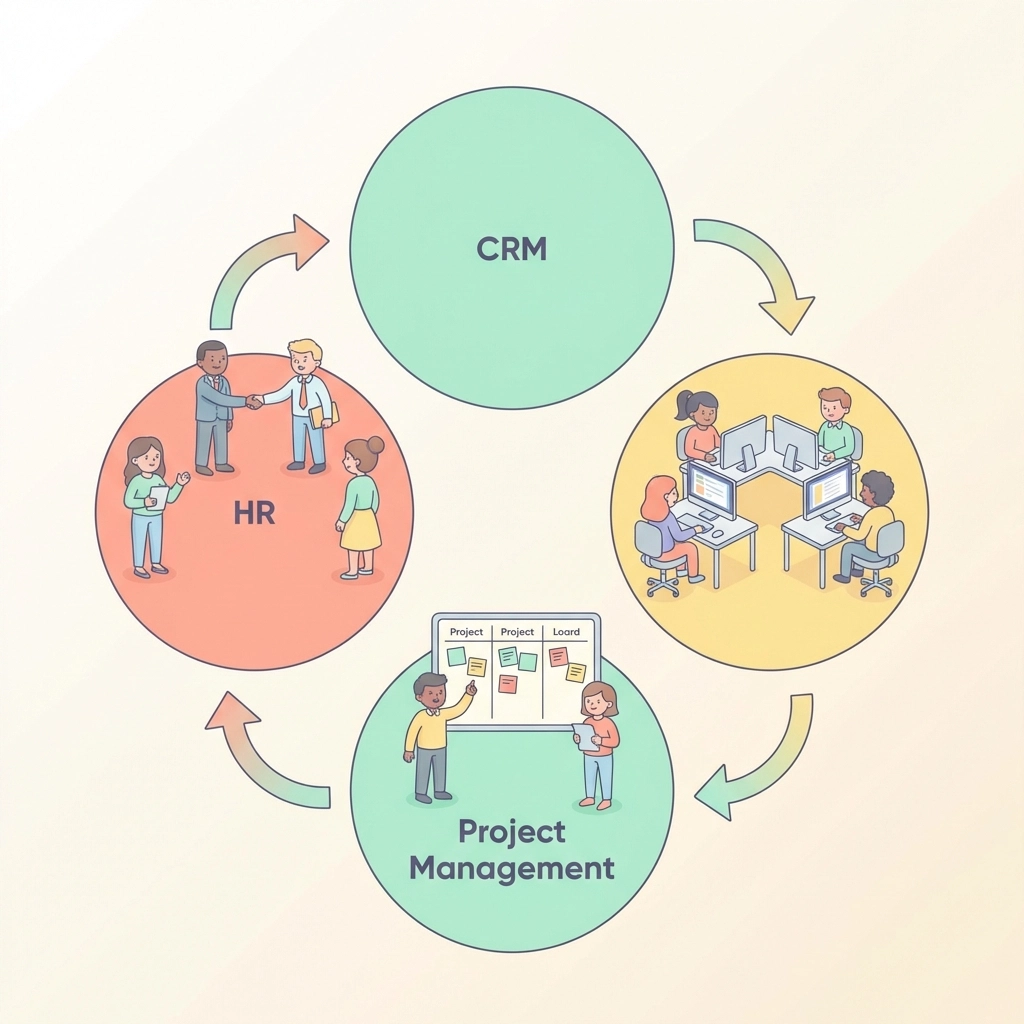
This exercise shows you exactly where a unified platform saves hours every week. Instead of manually updating three systems, you update one. The rest flows automatically.
Step 3: Choose the Right All-in-One Platform
Not all unified platforms are created equal.
Some are bloated enterprise monsters. Too complex. Too expensive. Too much for an SMB.
Others are too basic. They call themselves "all-in-one" but can't handle real business needs.
Here's what to look for:
Must-Have Features
- HR Management: Employee records, time tracking, leave requests, onboarding.
- CRM Capabilities: Contact management, deal tracking, communication history.
- Project Management: Tasks, deadlines, team assignments, progress tracking.
- Unified Dashboard: One place to see everything that matters.
- Automation: Rules that trigger actions automatically.
Nice-to-Have Features
- Mobile access for teams on the go.
- Customizable workflows for your specific processes.
- Reporting that pulls data from all three areas.
- Simple integrations with tools you can't replace (like email or accounting).
Red Flags to Avoid
- Pricing that explodes as you grow.
- Steep learning curves that require weeks of training.
- Poor customer support when things break.
TeamsMaster was built specifically for SMBs facing this exact challenge. It brings HR, CRM, and project management together without the enterprise complexity. Worth a look if you're serious about unification.
Step 4: Migrate Data and Build Your Workflows
This is the hands-on step. Roll up your sleeves.
Data Migration
Start with your most critical data:
- Customer records from your current CRM.
- Employee information from HR systems.
- Active projects and their status.
Most modern platforms offer import tools. CSV files work for basic migrations. Some platforms connect directly to popular tools for seamless transfers.
Important: Clean your data before migrating. Delete duplicates. Update outdated records. Fix formatting issues. Garbage in, garbage out.
Workflow Setup
Remember those connections you mapped in Step 2? Now you build them.
Create automated workflows for common scenarios:
- New client signed → Create project → Notify team lead → Schedule kickoff meeting.
- Employee requests time off → Update availability → Adjust project timelines → Notify affected team members.
- Project milestone completed → Update client record → Trigger invoice → Log achievement.
Start simple. Add complexity later. You don't need 50 automations on day one.

Test Everything
Before going live, run test scenarios:
- Add a fake client and watch the workflow trigger.
- Create a sample project and assign team members.
- Process a mock time-off request.
Catch problems now, not when real work depends on it.
Step 5: Train Your Team and Optimize Continuously
A unified platform only works if people actually use it.
Training Tips
- Keep it short. Nobody wants a 4-hour training session.
- Focus on daily tasks. Show them what they'll do most often first.
- Create quick reference guides. One-page cheat sheets work wonders.
- Designate power users. Train a few people deeply. They help others.
The First 30 Days
Expect questions. Expect hiccups. That's normal.
Hold brief check-ins during week one. Ask what's working. Ask what's confusing. Fix issues quickly before frustration builds.
Ongoing Optimization
Your unified system should evolve with your business.
Every month, ask:
- Are there manual tasks we could automate?
- Is any data getting stale or messy?
- Are there features we're not using that could help?
The best SMBs treat their systems like living things. They tweak, improve, and refine constantly.
The Unified Advantage in Action
Let's paint a picture.
Before unification: Your sales rep closes a deal. They email the project manager. The PM creates tasks in one tool. HR manually checks who's available. Someone updates the CRM. Three hours pass. Things fall through cracks.
After unification: Your sales rep closes a deal. One click converts it to a project. The system checks team availability automatically. Tasks generate with deadlines attached. The client record updates instantly. Everyone sees the same information. Ten minutes, tops.
That's the Unified Advantage.
Less chaos. More clarity. Faster growth.
Your Next Move
You don't have to do all five steps this week. But you should start today.
Begin with Step 1. Audit your tools. See what you're really working with.
Then keep moving. One step at a time.
Before you know it, you'll wonder how you ever ran your business any other way.
Scaling doesn't have to mean more complexity. Sometimes it means less.
Unify your systems. Simplify your work. Grow faster.
That's the SMB way.